Home / Technology
Hardware kits, connectivity and control — the layer underneath the locker.
LockerGrid provides a modular technology stack that can be integrated into different locker designs and deployments. Five layers, adopted whole or in part.
The LockerGrid technology stack
Hardware Kits + Electronics + Connectivity + Access Control + Platform + APIs
Not a finished locker product — the technology required to transform physical lockers into connected infrastructure.
01
Hardware Kit
Electronics and components required to add remote access and control to locker systems. Designed as modules that fit around a cabinet architecture rather than dictating it.
02
Connectivity
Connect lockers to the network so their status and access can be managed remotely. Cabinets report state upward and accept commands downward.
03
Access Control
Enable digital, remotely controlled locker access — replacing a physical key with a digital right to open a specific compartment at a specific time.
04
Cloud Platform
Manage devices, lockers, users, bookings and operational data across a site or an entire estate.
05
APIs / Integration
Allow solution providers and organizations to integrate LockerGrid into their own applications, systems and workflows.
System architecture
From the physical layer to the application layer.
The locker, the kit, the network, the cloud and the applications on top — with a clear boundary between what you build and what LockerGrid provides.
Physical layer
Locker
Cabinet
Door
Lock
Controller
Sensors
↓
Enablement layer
LockerGrid Kit
Controller board
Lock interface
Power
Wiring
Optional modules
↓
Transport layer
Connectivity
Device link
State reporting
Command channel
Health checks
↓
Software layer
LockerGrid Cloud
Device registry
Locker state
Users
Bookings
Analytics
↓
Application layer
Applications
Mobile app
Web dashboard
Customer systems
Third-party platforms
05
Technology layers
02
Routes in: solution or build
01
Platform behind every unit
∞
Cabinet designs supported
LockerGrid kits
A modular approach to smart lockers.
Configure the technology around your product architecture. A kit is a set of modules, not a fixed box — what goes in depends on the cabinet, the deployment and the access model.
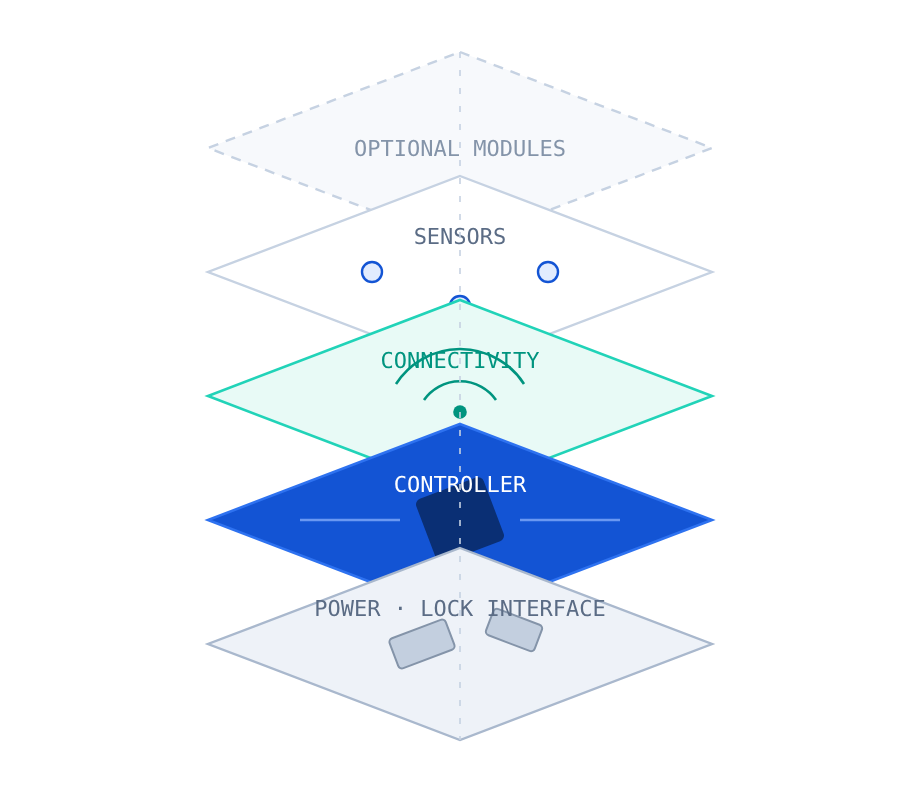
Illustrative kit composition — configured per product architecture
01
Power system
Supplies the electronics and lock actuation in the cabinet.
02
Electronic lock interface
Drives and reads the locking mechanism used in your design.
03
Controller
The core board that coordinates locks, sensors and connectivity.
04
Connectivity
Links the cabinet to the LockerGrid platform.
05
Sensors
Report door and compartment state back to the platform.
06
Wiring & connectors
Harnessing designed around your cabinet layout.
07
Optional modules
Additional capability where a deployment calls for it.
Technical specifications, module options and compatibility are confirmed during scoping. Nothing on this page should be read as a committed specification.
Access control
A digital right to open, instead of a physical key.
Access becomes something that can be granted, timed, revoked and recorded — rather than something carried in a pocket.

Granted
A user, a session or a booking is associated with a specific compartment.

Timed
Access can be bound to a duration — a session, a day, a term.

Revocable
Rights can be withdrawn centrally without touching the cabinet.

Recorded
Open and close events form an operational history.

Remotely controlled
Staff can release a compartment without being in front of it.

Phone-based
Where the deployment calls for it, the user’s phone becomes the key.
Which access methods apply to a given deployment depends on the hardware configuration and the requirements agreed during scoping.
Existing lockers
Already have lockers? You may not need to replace them.
Suitable existing locker infrastructure can potentially be retrofitted with LockerGrid technology — keeping the cabinets you already own while adding remote access, monitoring and booking.
- Cabinet, door and lock design are reviewed first
- Power and connectivity conditions on site are assessed
- A retrofit kit configuration is proposed for that estate
- Units are onboarded onto the platform as they are converted
Compatibility is assessed case by case and cannot be guaranteed for every locker design.
Before
Existing locker
Mechanical or keyed access
↓
Add
LockerGrid retrofit kit
Configured to the existing design
↓
After
Connected locker
Remotely operable and bookable
Existing locker → retrofit kit → connected locker
APIs & integration
Designed to sit inside systems that already exist.
LockerGrid is a layer, not an island. APIs allow solution providers and organizations to integrate locker capability into their own applications, systems and workflows — a membership app, a campus portal, a facilities system, a partner platform.
Your app, our lockers
Expose locker booking and access inside an application your users already have.
Your systems, our data
Bring locker state and usage into the tools your operations team runs on.
Partner platforms
Let a third-party platform orchestrate lockers as one more resource type.
Provider tooling
Solution providers can build their own layers on top for their customers.
Two ways in